大部分内容已发布在0xFFFF以寻求帮助
问题描述
我用vscode写了一个python脚本只含有print(1)这一行代码,F5调试运行的时候终端就会有如图的输出。

显然输出内容重复了一遍运行命令。并且结尾多了一个uuid。
问题分析
初步尝试发现换用conda的python环境(后测试发现仅部分)就不会有,使用IDLE运行、非调试运行和code runner也不会有。可以判断:是调试运行的锅
改变终端大小,让输出内容刷新就恢复正常。可以判断:是终端刷新的锅
发现c++也会有这样的问题。可以判断:排除了环境问题,插件问题
进一步尝试
更改VScode的默认终端换成cmd,发现正常调试运行。最终可以断定是Poweshell的锅。
虽然到这里可以直接选择换用cmd解决,但是还是想搞明白怎么解决Powershell的问题。
解决方法 | 该方法治标不治本
打开有关终端的setting.json在如图位置添加运行参数
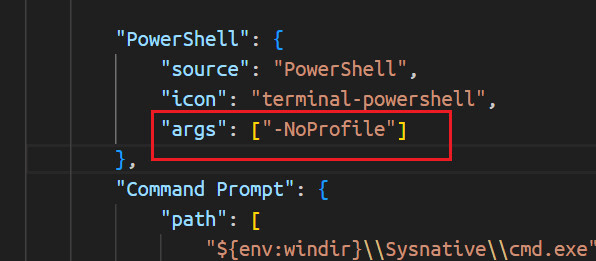
再次调试运行即可正常输出。
原因 | 已找到,附根治方法
该问题的最终触发原因是启用了VScode的集成终端,在启动终端的时候会使用默认的脚本进行处理shellIntegration.ps1。然而改脚本195行左右位置有这一段代码
	function Global:PSConsoleHostReadLine {
		$CommandLine = $Global:__VSCodeState.OriginalPSConsoleHostReadLine.Invoke()
		$Global:__VSCodeState.IsInExecution = $true

		# Command line
		# OSC 633 ; E [; <CommandLine> [; <Nonce>]] ST
		$Result = "$([char]0x1b)]633;E;"
		$Result += $(__VSCode-Escape-Value $CommandLine)
		# Only send the nonce if the OS is not Windows 10 as it seems to echo to the terminal
		# sometimes
		if ($Global:__VSCodeState.IsWindows10 -eq $false) {
			$Result += ";$($Global:__VSCodeState.Nonce)"
		}
		$Result += "`a"

		# Command executed
		# OSC 633 ; C ST
		$Result += "$([char]0x1b)]633;C`a"

		# Write command executed sequence directly to Console to avoid the new line from Write-Host
		[Console]::Write($Result)

		$CommandLine
	}
OSC 633 控制序列
VSCode Shell Integration 使用 OSC 633 系列序列来追踪命令执行:
- OSC 633;A – 提示符开始
- OSC 633;B – 提示符结束 / 命令输入开始
- OSC 633;C – 命令执行开始
- OSC 633;D – 命令执行结束(带退出码)
- OSC 633;E – 命令行内容(用于历史追踪)⚠️ 问题根源
问题链条:
- 命令拦截:
PSConsoleHostReadLine拦截用户输入的命令 - 内容转义:
__VSCode-Escape-Value将命令中的特殊字符转义
- 反斜杠
\→\x5c - 换行符
\n→\x0a - 分号
;→\x3b
- 序列发送: 转义后的命令通过 OSC 633;E 序列发送
- 渲染 Bug: VSCode 终端在处理长命令时,渲染引擎存在竞态条件
- 乱码显示: 本应隐藏的转义后的命令字符串被错误地显示到屏幕
直接修改 VSCode 的 Shell Integration 脚本,禁用导致问题的 OSC 633;E 序列发送。即可根治该问题
修改前:
function Global:PSConsoleHostReadLine {
    $CommandLine = $Global:__VSCodeState.OriginalPSConsoleHostReadLine.Invoke()
    $Global:__VSCodeState.IsInExecution = $true

    # Command line
    # OSC 633 ; E [; <CommandLine> [; <Nonce>]] ST
    $Result = "$([char]0x1b)]633;E;"
    $Result += $(__VSCode-Escape-Value $CommandLine)
    # Only send the nonce if the OS is not Windows 10 as it seems to echo to the terminal
    # sometimes
    if ($Global:__VSCodeState.IsWindows10 -eq $false) {
        $Result += ";$($Global:__VSCodeState.Nonce)"
    }
    $Result += "`a"

    # Command executed
    # OSC 633 ; C ST
    $Result += "$([char]0x1b)]633;C`a"

    # Write command executed sequence directly to Console to avoid the new line from Write-Host
    [Console]::Write($Result)

    $CommandLine
}
修改后:
function Global:PSConsoleHostReadLine {
    $CommandLine = $Global:__VSCodeState.OriginalPSConsoleHostReadLine.Invoke()
    $Global:__VSCodeState.IsInExecution = $true

    # Command line - DISABLED to prevent display issues with long commands
    # The OSC 633;E sequence was causing escaped command text to appear in terminal
    # OSC 633 ; E [; <CommandLine> [; <Nonce>]] ST
    # $Result = "$([char]0x1b)]633;E;"
    # $Result += $(__VSCode-Escape-Value $CommandLine)
    # if ($Global:__VSCodeState.IsWindows10 -eq $false) {
    #     $Result += ";$($Global:__VSCodeState.Nonce)"
    # }
    # $Result += "`a"

    # Command executed
    # OSC 633 ; C ST
    $Result = "$([char]0x1b)]633;C`a"

    # Write command executed sequence directly to Console to avoid the new line from Write-Host
    [Console]::Write($Result)

    $CommandLine
}
重启保存即可
瑕疵
改解决方法直接改动了vscode的默认代码而非可自定义的配置项,因此除非vscode官方修复了该错误(然而并没有,在该issue中仍处于为解决状态),否则每次vscode更新都会导致该终端注入脚本被重新覆盖,需要再一次修改,且改变该文件的可写权限也没用
可能最好的方法是禁用vscode的自动更新